Why Is My Neural Network Slow?

Updated: Sep 26
A simple guide to matrix multiplication, hardware, and the roofline
1. It is all matrix multiplication
A neural network does a lot of math. Most of that math is one thing: matrix multiplication.
A layer in a network takes an input and multiplies it by a table of numbers called weights. That is a matrix multiplication. Most of the time a network runs, it is doing this.
So if we want fast AI, we need fast matrix multiplication.
الشبكة العصبية تقضي معظم وقتها في ضرب المصفوفات، لذلك تسريع الذكاء الاصطناعي يعني تسريع ضرب المصفوفات.
2. How matrix multiplication works
We have two matrices, A and B. We want C = A × B.
A has N rows and K columns.
B has K rows and M columns.
C has N rows and M columns.
To get one number in C, take one row of A and one column of B. Multiply them number by number, then add everything up.
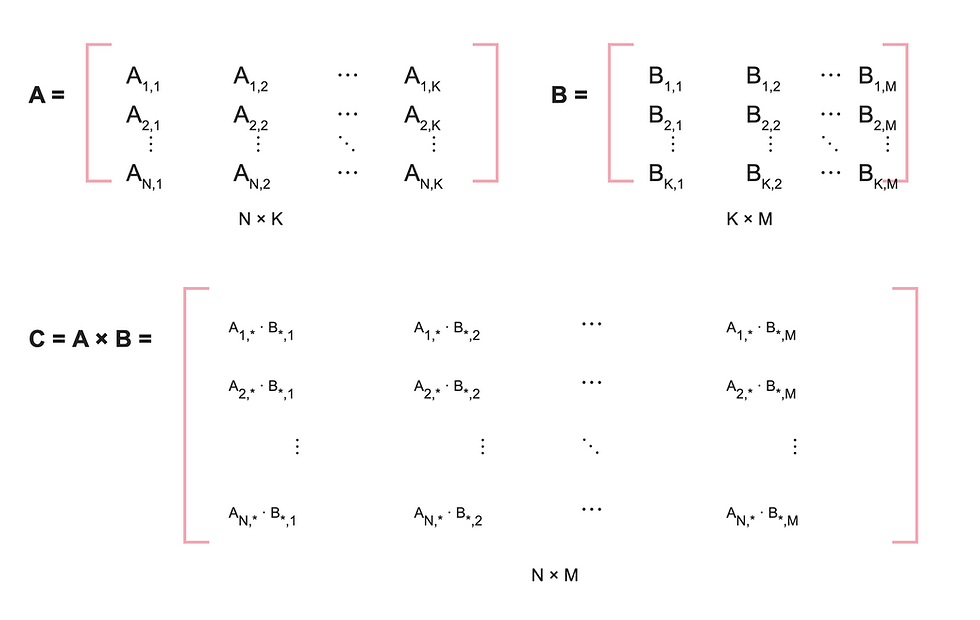
Each "multiply, then add" step is called a MAC (multiply-accumulate).
We can write this with three loops:
Loop 1 picks a row of A.
Loop 2 picks a column of B.
Loop 3 walks along the row and column, doing one MAC each time.
Two names to remember:
gemm = matrix × matrix (like above)
gemv = matrix × vector (a matrix times a single column, so M = 1)
كل رقم في الناتج هو حاصل ضرب صف في عمود، والحلقات الثلاث تحسب ذلك رقمًا بعد رقم.
Test yourself / اختبر نفسك
As shown, the first output cell in CC is 1×7+2×111×7+2×11, so it needs 2 MACs using accumulative addition +=; therefore, for AN×K and BK×M, total MACs =N×M×K
2. Our tri-loop
Now, let's code it ourselves by attempting to implement matrix multiplication without using ready-made libraries. Typically, you'll use a nested loop like this:

Now let's test its latency with A as 64*64 and B as 64*64 as well.
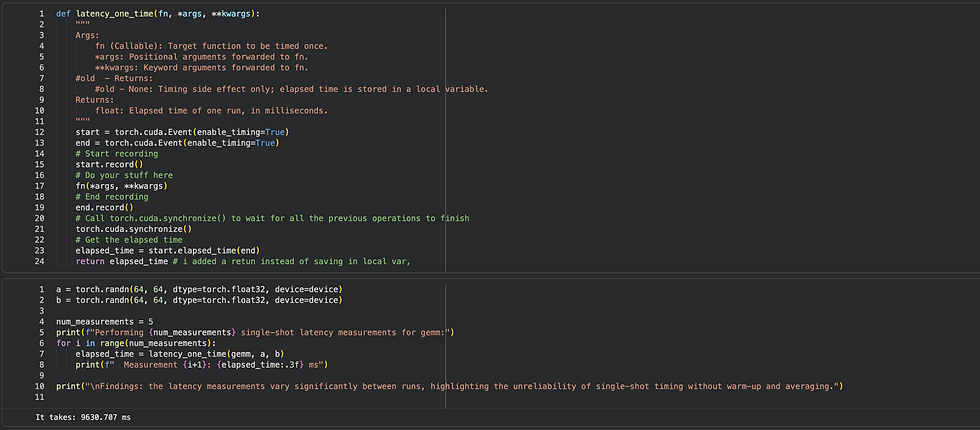
For multiplying only small matrices, we have to wait nearly 10 seconds!
You might wonder: are you using a CPU or GPU? How many cores are there? What's the capacity of your memory? These are all valid questions, and to answer them, let's explore these components.
4. What a computer is made of, and how to count the work
A computer has three main parts for this work:
Processor (CPU or GPU): does the math. Its limit is compute speed, measured in FLOPs per second.
Memory (RAM or GPU VRAM): holds the data. Its limit is capacity, measured in bytes.
The link between them: moves data back and forth. Its limit is bandwidth, measured in bytes per second.
المعالج يحسب، والذاكرة تخزّن، والوصلة بينهما تنقل البيانات، ولكل منها حدّ
Matrix A is loaded into memory, and the processor performs the necessary calculations, including multiplication and addition (+=), before writing the result back to memory. So to understand speed, we count two things: how much data moves (bytes) and how much math is done (FLOPs).
Data:
Read A: N × K numbers
Read B: K × M numbers
Write C: N × M numbers
Each float32 number is 4 bytes (32 bits ÷ 8 = 4)
For our 64×64 case:
Read A: 64 × 64 × 4 bytes
Read B: 64 × 64 × 4 bytes
Write C: 64 × 64 × 4 bytes
This is what happened between memory and processor. But how many operations did the processor do? It did many MACs — and the number of MACs is N × M × K, which in this case is 64 × 64 × 64.
Math:
MACs stands for Multiply-ACcumulate. One MAC means: multiply two numbers, then add the result to a running total. It's the "multiply, then add" step we saw in section 2.
MACs = N × K × M, where:
N = number of rows in A (also the rows of C)
K = number of columns in A, which must equal the number of rows in B (the shared size)
M = number of columns in B (also the columns of C)
Why multiply these three? C has N × M numbers. Each number needs K MACs (one for each pair in the row and column). So the total is N × M × K.
Example: in our 2×2 example, N = K = M = 2, so MACs = 2 × 2 × 2 = 8. That's the 8 clicks in the step-through.
FLOPs stands for FLoating-point OPerations: any single math operation on decimal numbers, like one multiply or one add.
FLOPs = 2 × MACs, because one MAC is actually two operations: one multiply + one add.
Example: 8 MACs = 8 multiplies + 8 adds = 16 FLOPs.
So now you know why our tri-loop is slow:
64 × 64 × 64 = 262,144 MACs.
It took about 10 seconds. So each MAC took:
10 s ÷ 262,144 ≈ 0.000038 s = 38 microseconds (we will see in a moment why that is so much).
A bigger example: A is 512×256, B is 256×512 (N = 512, K = 256, M = 512)
Bytes:
Read A: 512 × 256 × 4 = 524,288
Read B: 256 × 512 × 4 = 524,288
Write C: 512 × 512 × 4 = 1,048,576
Total: 2,097,152 bytes
Math:
MACs = 512 × 256 × 512 = 67,108,864
FLOPs = 2 × 67,108,864 = 134,217,728
نحسب كمية الحساب (FLOPs) وكمية البيانات المنقولة (bytes) لنعرف حجم العمل المطلوب.)
Test it here :
By now, I hope you can do the accounting yourself: for any matrix multiplication, you can count how many operations it takes and how many bytes have to move — regardless of how strong the processor, memory, or bandwidth happens to be.
5. CPU vs. GPU
Now for a surprise: run this exact tri-loop on a 64×64 matrix and the CPU can actually beat the GPU — even though the GPU is, on paper, hundreds of times more powerful.
A CPU has a few strong cores. A GPU has thousands of simple cores that work at the same time.

CPU
A CPU never reads one number at a time; every read pulls in a whole 64-byte cache line (16 floats). Because A is walked along a row, one line serves 16 reads in a row — but B is walked down a column, where consecutive elements sit 256 bytes apart, so each read drags in a fresh line and throws away 60 of its 64 bytes. The animation below shows exactly this: for A, every fetched line is fully used; for B, only one float per line is ever touched.
this is how CPU will wotk with our tri-loop:
GPU
On a GPU the outer two loops disappear: 4,096 threads each own one output C[i][j] and run only the k loop, in warps of 32 that execute every instruction together. At each step the 32 threads of a warp ask for B[k][j…j+31] at once, and the hardware merges those 32 requests into a single 128-byte line with nothing wasted — the column walk is still there over time, but at any instant the warp reads across a row, which is all the memory system sees. The catch is that for a 64×64 matrix the PCIe copy in and out and the kernel launch cost more than the computation itself, so the GPU only pays off when the matrices grow large enough for the N³ work to dwarf the N² transfers.
this how it will work with our tri-loop
So the raw numbers of a processor tell you almost nothing: the same 262,144 MACs cost the CPU a cache miss on every read of B, and cost the GPU a PCIe round-trip that is longer than the whole computation. What decides the speed is the shape of the data movement — how much you fetch versus how much you actually use, and how far the data has to travel — and that is exactly the arithmetic we did above.
But a T4 GPU can do 8,100,000,000,000 FLOPs per second. One MAC = 2 FLOPs, so all 262,144 MACs = 524,288 FLOPs. At full speed:
524,288 ÷ 8,100,000,000,000 ≈ 0.0000000647 s = 64.7 nanoseconds
That is about 150,000,000 times faster than our tri-loop.
The reason: the animations showed the hardware's cost of our tri-loop. Our code adds a much bigger one on top — it runs from Python, one tiny step at a time, and every one of the 262,144 iterations launches its own miniature GPU kernel. The GPU has thousands of cores, but only one is working, for one multiply, then it waits for Python to hand it the next.
So what if we change our code?
Meet torch.matmul. PyTorch has a built-in function for matrix multiplication called torch.matmul. It gives the same answer as our tri-loop, but experts wrote it to use the GPU well: it gives the whole matrix to all cores in a single launch.
Let's time both on the same 64×64 matrices

Our tri-loop gemm: 9.84 seconds
torch.matmul: < your number > seconds
Same matrices, same GPU, same answer. So why is one so much faster?
A fast GPU is not enough. Your code must use it well.
Don't write math with Python loops — they run one step at a time and leave the GPU idle.
Use built-in operations like torch.matmul — specialists wrote them to use every core.
Think in whole matrices, not single numbers — give the GPU one big job, not thousands of tiny ones.
This interactive panel allows you to observe what happens inside your GPU when using tri-loop compared to torch.matmul.
المعالج الرسومي السريع لا يكفي وحده؛ على مهندس الذكاء الاصطناعي أن يكتب كودًا يستخدم معظم الcores، مثل torch.matmul بدلًا من loops.
6. Which limit wins? The roofline
Now we ask: is the processor waiting for data, or is the data waiting for the processor?
For the rest of the post I'll switch to a bigger GPU, the RTX A6000, because its spec sheet makes the arithmetic clean — the method is the same for any processor.
Using the 512×256 example on an A6000 (38.7 × 10¹² FLOPs/s, 0.768 × 10¹² bytes/s):
Time moving data = 2,097,152 ÷ 768,000,000,000 ≈ 2.73 µs
Time doing math = 134,217,728 ÷ 38,700,000,000,000 ≈ 3.47 µs
Math takes longer. So this is compute-bound. ("Bound" means "limited by.")
Shortcut: arithmetic intensity (AI)
AI = FLOPs ÷ bytes → how much math we do for each byte we move
Ridge point = peak FLOPs/s ÷ peak bandwidth → where the hardware switches
For our example:
AI = 134,217,728 ÷ 2,097,152 = 64 FLOPs/byte
Ridge (A6000) = 38.7 ÷ 0.768 ≈ 50.4 FLOPs/byte
64 > 50.4, so it is compute-bound. Same answer as before.
هنا نحتاج نعرف الـ Arithmetic Intensity (AI)، وهي طريقة تساعدنا نعرف هل الكود حقنا يستهلك وقته في الحساب أو في نقل البيانات. وطريقة حسبتها بسيطة: نقسم عدد العمليات الحسابية على عدد البيانات المنقولة، يعني AI = FLOPs ÷ bytes. - إذا كانت قيمة AI أقل من الـ Ridge → الكود memory-bound: المعالج ينهي حسابه بسرعة ويقعد ينتظر البيانات توصله. اللي يحدد السرعة هنا هو الـ bandwidth. - إذا كانت قيمة AI أكبر من الـ Ridge → الكود compute-bound: البيانات واصلة وجاهزة، والمعالج هو اللي ما يلحق. اللي يحدد السرعة هنا هو الـ peak FLOPs/s. أما الـ Ridge point فهو معتمد بشكل كامل على المعالج عندك، ونحسبه بقسمة سرعة الحساب على سرعة نقل البيانات: peak FLOPs/s ÷ peak bandwidth إذا كان عندك معالج، لازم تضبط الكود حقك عشان يتماشى معه. وإذا ما شريته ، لازم تحسب هذي المعادلات حتى تعرف المواصفات الي تحتاجها
The rule:
AI below the ridge → memory-bound. Speed = bandwidth × AI.
AI above the ridge → compute-bound. Speed = peak FLOPs/s.
Where do the A6000 numbers come from?
Compute: 10,752 cores × 2 FLOPs × 1.8 × 10⁹ clock ≈ 38.7 × 10¹² FLOPs/s
Bandwidth: 48 bytes per transfer × 16 × 10⁹ transfers/s = 0.768 × 10¹² bytes/s
So .. how to find the bottleneck (the thing that slows your code down)?
follow three simple steps:
First, count the work:
how many math operations the code needs (FLOPs),
and how much data must move from memory (bytes).
Second, divide them to get AI = FLOPs ÷ bytes.
Third, compare the AI with the ridge point of your processor:
if the AI is smaller, the bottleneck is moving data (memory-bound);
if it's bigger, the bottleneck is math speed (compute-bound).
Why does this matter? Because the fix depends on the bottleneck.
Limit | Unit | Problem when you hit it |
Compute | FLOPs/s | Compute-bound: runs, but math is the slow part |
Bandwidth | bytes/s | Memory-bound: runs, but moving data is the slow part |
Capacity | bytes | Doesn't run at all: out of memory |
Which one do you want? (compute-bound VS memory-bound)
Compute-bound is where you want to be. It means the processor is fully busy — you are getting the peak FLOPs/s you paid for, and the only thing left slowing you down is the math itself.
Memory-bound means the opposite: the processor finishes its math and sits waiting for bytes. You are paying for FLOPs you never use.
So the goal is not to make matrices small; it is to push AI up, past the ridge. That is what every trick in section 8 does. And if a compute-bound job is still too slow, the fix is to do less math (a smaller model, pruning), not to shrink the work until the processor goes idle again.
Now, when you have slowness in your code, you need to figure out , is it memory-bound or is it processor-bound . Rofline help us to this .. check this interactive panel :
First: what does TFLOPS mean?
T = trillion.
TFLOPS = how many trillion operations the GPU can do per second. It's the speed of computation.
Second: what's fixed and what's variable?
Fixed = the hardware. When you buy a GPU, it has two numbers that don't change:
Its maximum compute speed (on the A6000: 38.7 TFLOPS)
Its maximum speed for moving data from memory
These two numbers draw the whole blue line, so the line stays fixed as long as the hardware is the same.
Variable = things you decide when writing the code, based on your needs and your design:
Problem size. In an N×N matmul, a bigger N means more MACs, and therefore more FLOPs. FLOPs are the numerator of the AI, and they grow faster than the bytes, so the AI increases.
Precision. Each number takes 4 bytes in fp32 but only 2 bytes in bf16. Same FLOPs, half the bytes, so the AI doubles: a bf16 matmul has AI = N/3 instead of N/6. This is called Quantization
The number of transfers to and from memory (we'll cover this later).
Design changes (for example, adding batches, layers, pruning, and so on).
How to read the chart:
Calculate the AI of the operation from the code, for example a matrix multiplication.
Find that value on the X axis.
Go up until you hit the blue line.
Read the Y axis. That's the maximum possible speed for this operation on this hardware.
If that maximum speed is too slow, go back to the variables above and adjust them.
TFLOPS = سرعة الحساب: كم تريليون عملية في الثانية.
الثابت هو الجهاز: سرعة الحساب وسرعة الميموري، وهم اللي يرسمون الخط الغامق المائل.
المتغير هو قراراتك في الكود: حجم المسألة، الدقة، عدد مرات النقل من الميموري، والتصميم (batches, quantization, pruning...).
قراءة الرسم: احسب الـ AI ← روح لها على X ← اطلع للخط الغامق ← اقرأ Y (.. هذي هي أقصى سرعة ممكنة).
ولو كانت بطيئة، ارجع للمتغيرات (قراراتك في الكود) وعدّلها. القسم التالي رح يساعدك في اتخاذ بعض القرارات
8. How does this help neural networks?
Now we know how to find the bottleneck. The fix depends on which limit we hit.
Memory-bound? → Move fewer bytes.
Quantization:
Quantization means storing each number with fewer bytes. float32 uses 4 bytes per number; int8 uses only 1 byte.
The math for gemv with N = 1024:
FLOPs don't change: 2 × 1024 × 1024 = 2,097,152. We still do the same multiplies and adds.
float32 bytes: (1024 × 1024 + 1024 + 1024) × 4 = 1,050,624 × 4 = 4,202,496
int8 bytes: (1024 × 1024 + 1024 + 1024) × 1 = 1,050,624
float32 AI: 2,097,152 ÷ 4,202,496 ≈ 0.5
int8 AI: 2,097,152 ÷ 1,050,624 ≈ 2.0
Same math, 4× fewer bytes, so up to 4× faster.
Batching:
Batching means processing many inputs at the same time instead of one by one.
In a neural network layer, the weights are a matrix, and each input is a vector. One input at a time is a gemv. If we put 64 inputs side by side, they form a matrix, and the whole thing becomes one gemm. So batching raises the arithmetic intensity, and it's one of the easiest ways to move a layer out of the memory-bound region
Fusion
Fusion means combining several operations into one kernel, so intermediate results stay on the compute side instead of going back to memory between steps.

In the top picture, the data goes through three simple steps:
squares → triangles → circles → rectangles.
Each step is a separate operation, so each one reads its input from memory, does a tiny bit of math, and writes the result back to memory, just so the next step can read it again.
In the bottom picture, the three steps are fused: the squares are read once, all three steps happen on the compute side, and only the final rectangles are written back.
The math for 1 million float32 numbers (4 MB) going through 3 steps:
FLOPs don't change: the same 3 steps happen either way.
Unfused bytes: 3 steps × (read 4 MB + write 4 MB) = 24 MB
Fused bytes: read 4 MB once + write 4 MB once = 8 MB
3× fewer bytes, so the AI is 3× higher, and up to 3× faster
The more steps you fuse, the bigger the saving. In our experiment, an activation function made of 8 small steps ran 6.9× faster after fusion. torch.compile does this fusion automatically.
Tiling
Tiling means splitting a big matrix into small blocks (tiles) that fit in fast on-chip memory, and reusing each tile many times before loading the next one.
The math for an N × N matmul in float32 with N = 1024:
Without tiling: each output number reads a full row of A and a full column of B from memory. Nothing is reused, so AI ≈ 0.25 no matter how big N is.
With 32 × 32 tiles: each number loaded is reused 32 times, so AI ≈ 32 / 4 = 8.
Ideal (every matrix read only once): AI = N / 6 ≈ 170.
Compute-bound? → Do fewer FLOPs
Pruning
Pruning means removing weights that don't matter. Fewer weights, fewer MACs.
Too big for memory? → Make the model smaller.
This is the heart of TinyML: running networks on phones and tiny chips with very little memory.


Comments